Bill of Quantities,
right inside Excel

An estimating library, PDF plan take-off, and full dim workings. Built into the Excel task pane — no exports, no context switching.

Start 30-day free trial See it in action →
Microsoft Excel Add-in · Windows · Mac · Web · iPad

A complete estimating workflow

Five core tools that live inside your spreadsheet — no switching windows, no stitching files together.
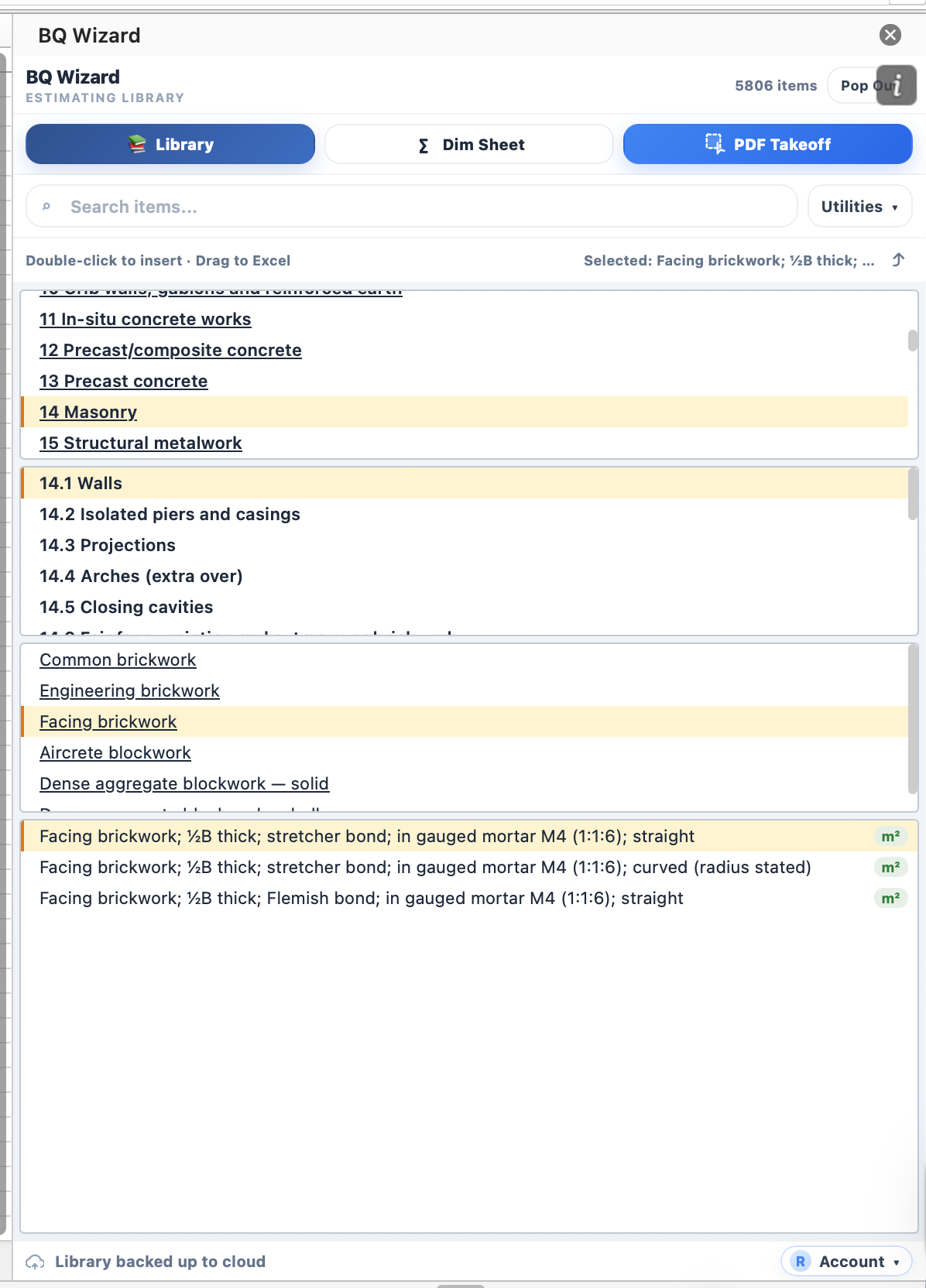
BQ Wizard estimating library in the Excel task pane, showing 5,806 NRM/SMM items.
The Library

An estimating library on a side panel

Ships with a 5,806-item NRM/SMM catalogue — masonry, concrete, structural, and more — organised as a searchable tree. Or build your own library from scratch: your trades, your rates, your wording. Double-click any item and it drops into the active cell with its unit, description, and formatting intact.
  • Build unlimited custom libraries — add, rename, and group items your way
  • Import from XLSX or export to share a library across your team
  • Per-item bold, underline, colour and font size preserved on insert
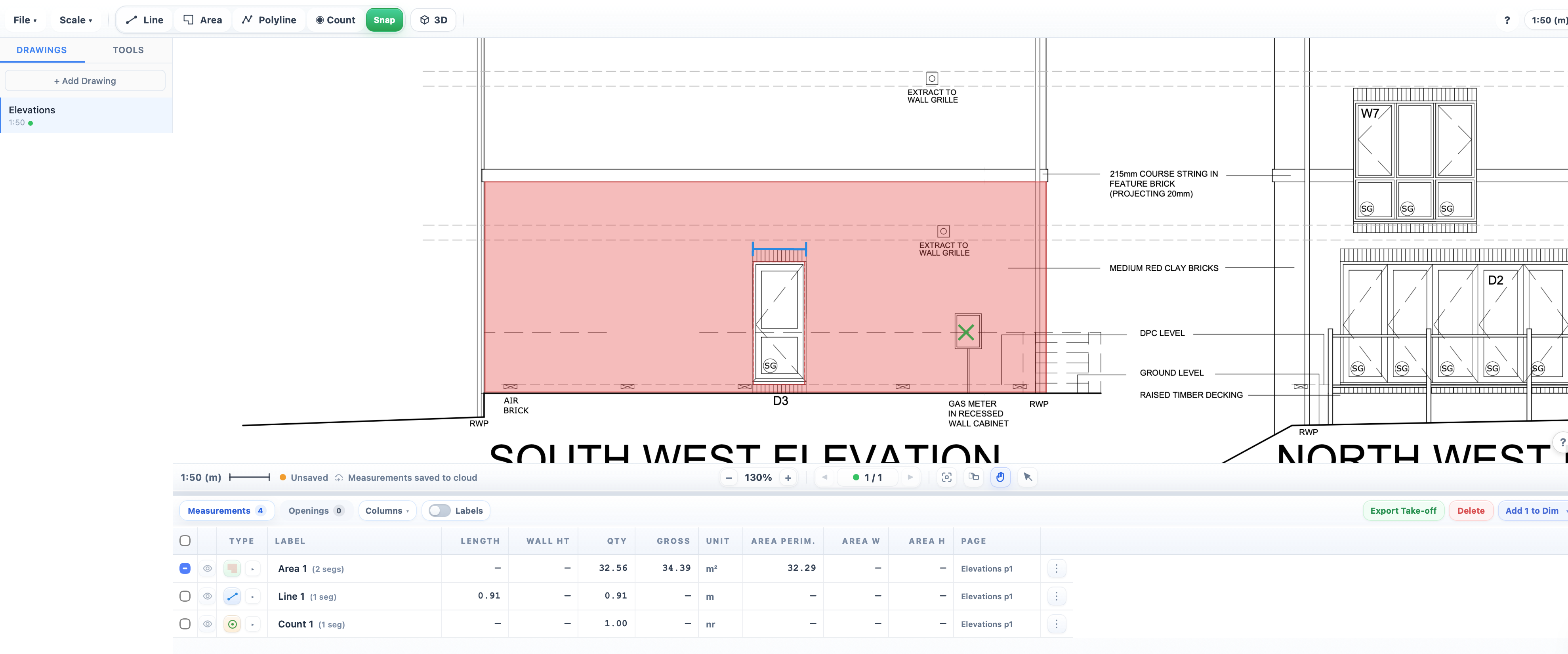
PDF plan take-off with an area measurement on a brickwork elevation.
PDF Take-off

Measure straight off the PDF

Open any drawing, set the scale once, then measure with Line, Area, Polyline, Count and Offset tools. Build your own Plan, Elevation, Wall Type and Feature tools — organise them into folders, or spin one up on the fly with the auto tool renamer: click any text on the PDF and a tool is created in seconds.
  • Offset tool generates parallel lines — footings, cavities and wall skins in one pass
  • Custom tool kits with folders; auto-name a new tool from any PDF label
  • Built-in PDF optimiser — open huge site drawings that crash Acrobat and Preview
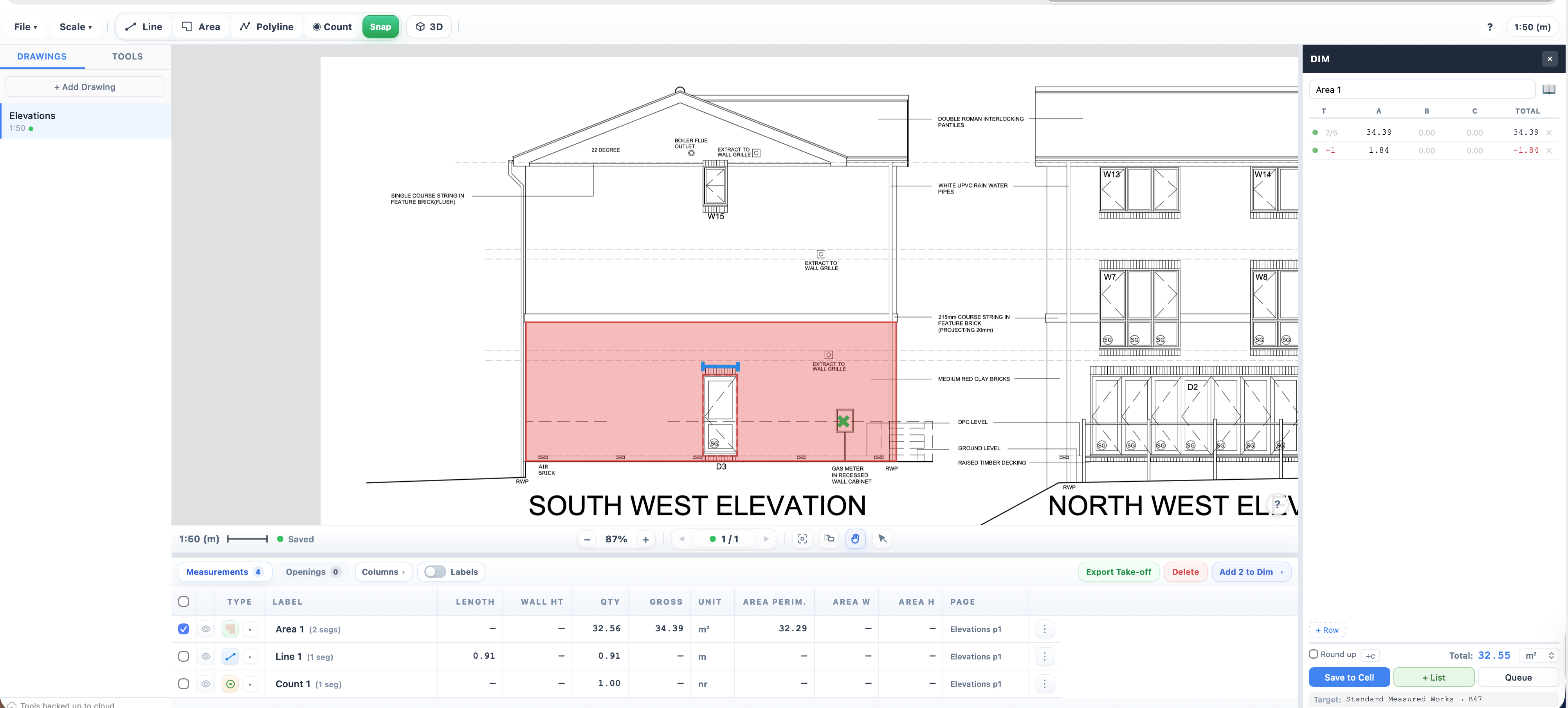
PDF take-off with the dimension panel showing a deduction row.
Dim Workings

A full dim sheet, without leaving the cell

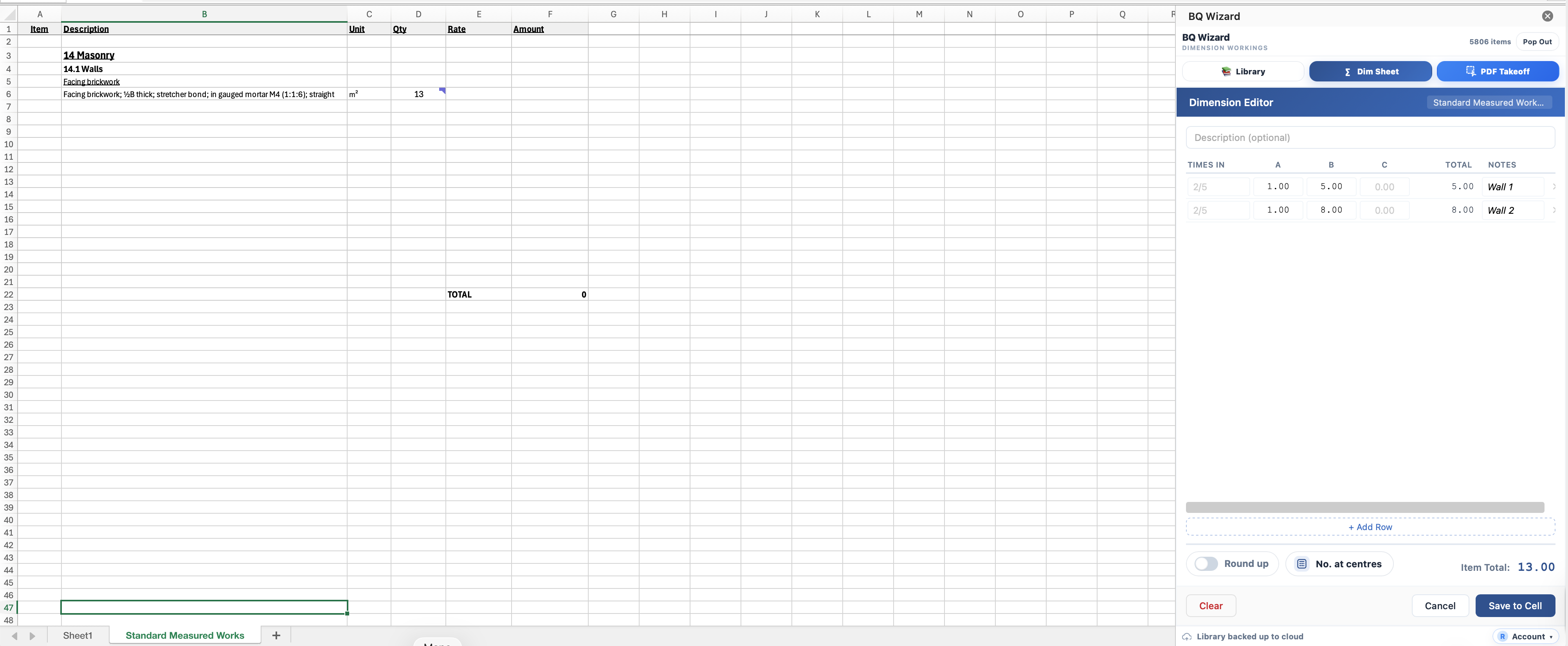
Every take-off rolls into a real dim sheet — times-in, A × B × C, totals, notes. Handle deductions for openings and voids, round up, apply centres. Save the total to the active cell or queue a list and insert them in order.
  • Deductions and openings tracked per measurement
  • Round-up and “number at centres” built in
  • Save-to-cell or queue-and-insert workflows
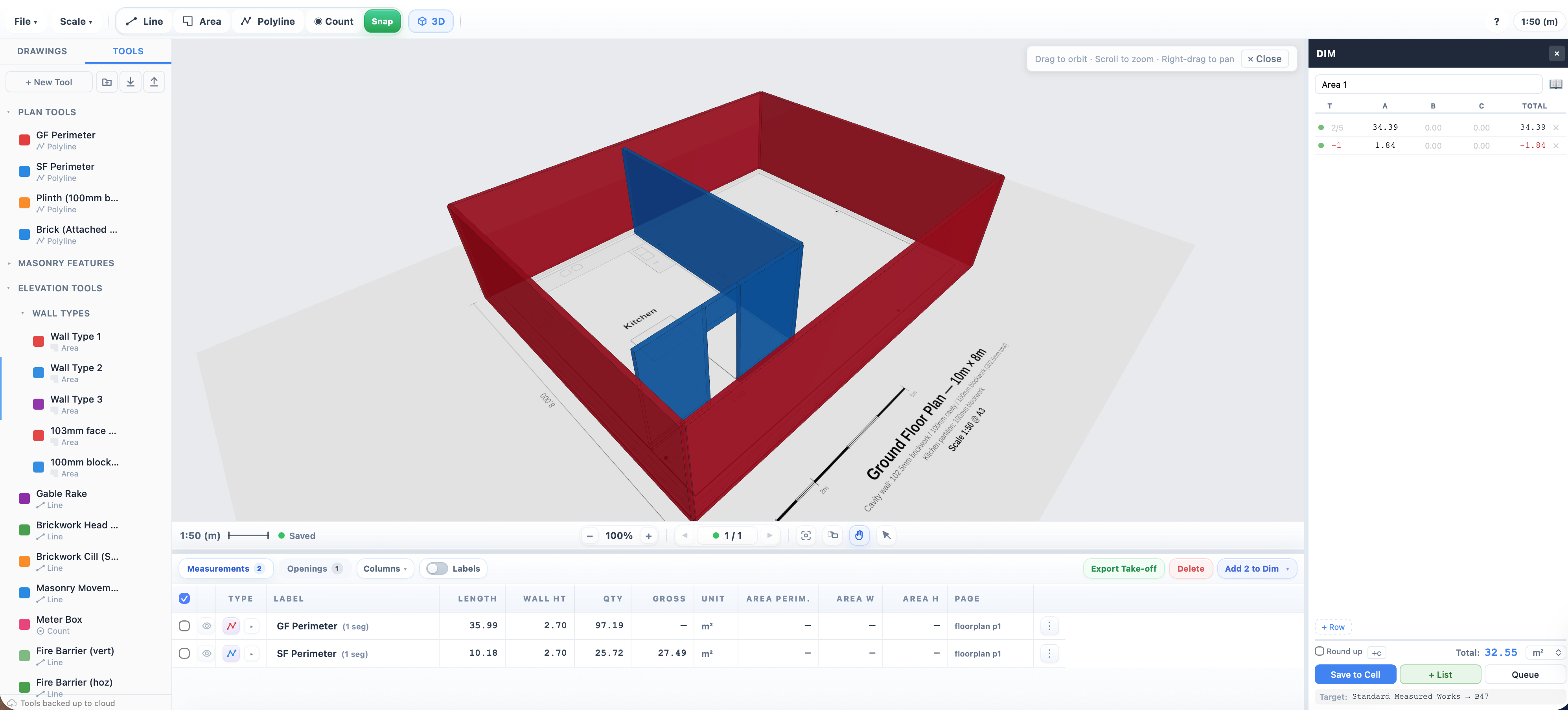
3D view of a floor plan with custom Plan Tools and Wall Types in the sidebar.
Live 3D View

Your 2D plans, in 3D as you measure

Every line, wall and opening you take off appears in a live 3D model. Spin the plan, catch the wall you missed, and see deductions for openings and voids rendered in context — not just as numbers on a page.
  • Real-time 3D updates as you measure — spot missed walls instantly
  • Openings and deductions shown visually, not just on the dim sheet
  • Turn a flat floor plan into a walkable model, no CAD experience required
Excel spreadsheet with an NRM item inserted and the Dimension Editor panel open.
Excel-Native

Right-click and go

Right-click any cell to insert a BQ unit — m², m³, lin m, nr, item, sum, prov sum, % — or open the dim editor. No context switching. Your spreadsheet stays your spreadsheet.

  • Context-menu units and one-click dim editor
  • Formatting follows the library item, not the sheet
  • Works on Excel for Windows, Mac, Web and iPad

Also included

The pieces that keep it practical.

Cloud sync

Libraries, measurements and tool kits sync across your machines.

Two devices per licence

Activate on your desktop and laptop with a single key.

Cross-platform

Excel on Windows, Mac, Web and iPad. Same file, same workflow.

Your data stays yours

Libraries export to XLSX; measurements export to a worksheet. No lock-in.

How it works

1

Install from AppSource

Add BQ Wizard to Excel in a couple of clicks — no separate download.

2

Activate your licence

Enter your email and licence key. Start with a free 30-day trial.

3

Measure, insert, export

Take off from PDFs, insert items into cells, export workings back to Excel.

Pricing

Try BQ Wizard free for 30 days. No credit card required.
Free Trial

Free
30 days · no card required
  • Full feature access
  • Cloud sync included
  • Up to 2 devices
Start Trial

Monthly

£9.99
per user / month
  • Full feature access
  • Cloud sync included
  • Up to 2 devices
  • Email support
Get Started